

How to Compare Gaming Account Listings: A Practical Buyer Checklist
The most impressive gaming account listing may also be the hardest to assess. When you compare gaming account listings, headline claims and inconsistent formats can hide important gaps. One seller may describe account contents in detail, while another leaves access or transfer terms unclear. A high level or rare item alone isn’t enough to judge whether an offer fits your needs.
Before spending money, compare details you can assess consistently rather than claims that simply sound impressive. This guide explains how to review account attributes, identify missing information, and weigh seller details and transaction terms. It also shows how to compare what a listing demonstrates with what it only promises.
Access control, original-owner risk, and the game publisher’s rules also matter. Account transfers may violate a publisher’s terms and put continued access at risk. Use the checklist to compare third-party offers on Gameoro while keeping those limitations in view.
Key Takeaways
- Compare the game, account type, level or rank, and included items, but only treat details as comparable when listings provide equivalent information.
- Separate seller claims, screenshots, and independently verifiable information to understand what each listing actually supports.
- Use a side-by-side checklist to compare gaming account listings and flag missing details before deciding.
- Review seller information and any visible transaction history as context, not as a substitute for assessing the account details.
- Gameoro connects buyers and sellers through third-party gaming account listings, giving you a place to apply the same comparison checklist across offers.
Why compare gaming account listings by the same standards?
A useful comparison covers equivalent account details, the evidence behind each claim, the seller context shown, and the stated access and transfer terms. It gives you a clearer basis for weighing offers. It doesn’t prove that an account will remain accessible, confirm every claim, or guarantee what happens after a transaction.
Ask the same questions about each listing. A headline such as “high rank” and one such as “rare items” describe different features, not equivalent accounts. Compare like with like where possible, then record unique features separately. Don’t treat one feature as a substitute for another.
What counts as a like-for-like account comparison?
Start with listings for the same game and, where relevant, the same account type. Compare shared attributes using the same units or categories. A stated rank can be compared with another rank, but not treated as equivalent to a character level. Note features unique to one offer separately. Record what each seller states, and don’t fill gaps with assumptions.
Why can similar listing headlines hide important differences?
Broad labels can omit details that affect a comparison, including account history, included access, and how the transfer is described. Sellers may also use the same terms differently. “Full access,” for example, isn’t a useful comparison point unless the listing explains what that means. If a detail is missing, mark it as unknown. The omission alone doesn’t prove there’s a problem.
Keep stated facts separate from your interpretation. If a listing gives a rank without context, record the rank and note what’s missing. If one offer lists extra items, record those as a separate feature. A longer item list shouldn’t make the core account details seem more comparable than they are. This is the basis of a consistent process to compare gaming account listings.
Keep publisher policies in view, too. Rules differ by game, and some publishers prohibit account sales or transfers. Review the current terms for the relevant game before deciding. A careful comparison helps you understand what each seller claims, but it can’t remove policy risks or guarantee an account’s future status.
Which gaming account listing details should you compare?
Make a side-by-side record before weighing offers. A listing is easier to compare when it states account attributes in clear, specific terms. If a detail appears in only one listing, mark it as unique or unknown rather than treating it as a direct advantage.
| Attribute | Listing A | Listing B | Comparison note |
|---|---|---|---|
| Game and version or platform | Are they the same? | ||
| Account type | Do the labels mean the same thing? | ||
| Level or rank | Compare the same measure. | ||
| Included items or content | Record named items separately. |
Compare game, progression, and included content
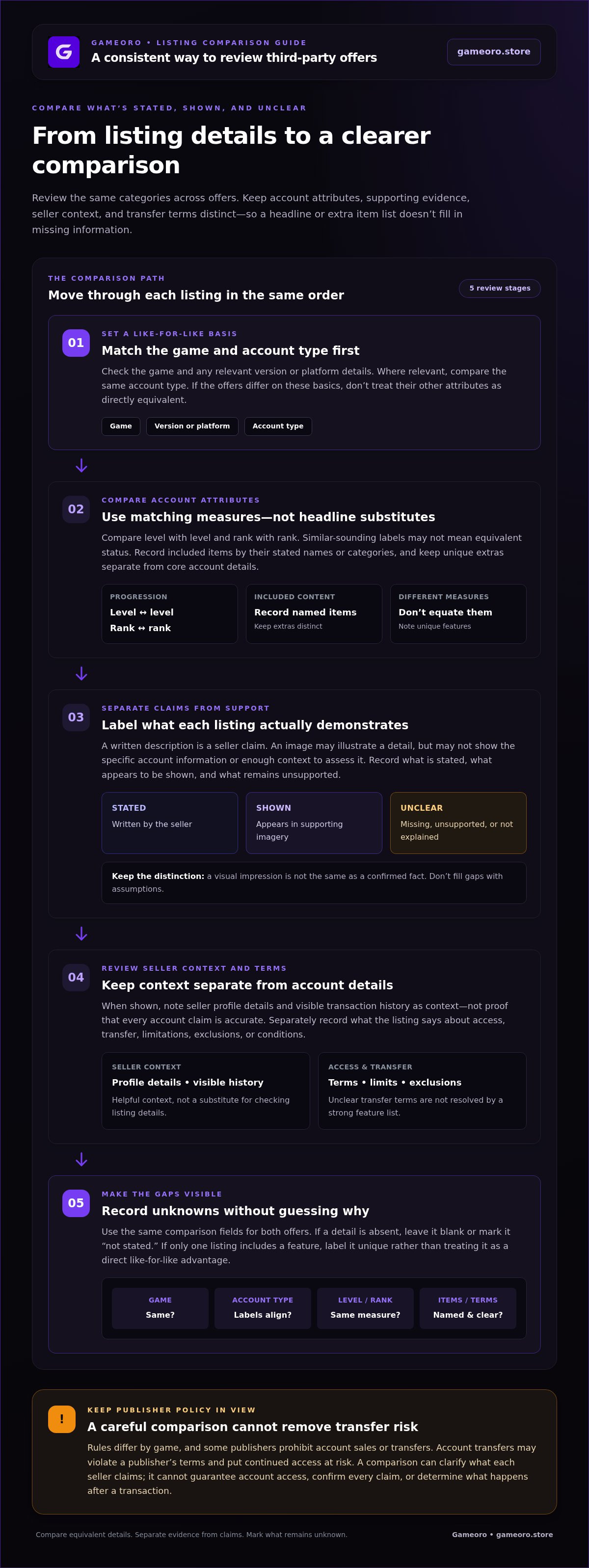
Check the game and any relevant version or platform details first. Then compare matching measures: level with level, rank with rank, and one type of progression with the same type. Similar-sounding labels don’t necessarily indicate equivalent status. Record included items by their stated names or categories, and keep extras separate from core account attributes.
Next, distinguish seller statements from the evidence shown. A written description is a claim. An image may illustrate it, but might not clearly show the specific account detail or provide enough context to assess it. Note what the text says, what the image appears to show, and what remains unsupported. Don’t turn a visual impression into a confirmed fact.
Compare access, transfer, and listing conditions
Read what the listing says about access and how the seller describes the transfer. Record any stated limitations, exclusions, or conditions, such as content that isn’t included or access with a stated restriction. Keep these notes separate from level, rank, and items. A strong feature list doesn’t resolve unclear transfer terms.
Use consistent labels in your comparison: stated, shown, and unclear. If both listings describe the same attribute but only one provides supporting detail, the information isn’t equally supported. If a field is absent, leave it blank or mark it “not stated.” That makes the gap visible without guessing why it exists.
Apply this checklist as you browse gaming account listings on Gameoro, a marketplace connecting buyers and sellers through third-party offers. Compare what each listing presents, not what its headline suggests.
How do seller details and evidence change the comparison?
Account attributes tell only part of the story. Seller information and supporting evidence add context, but they don’t establish that every account claim is accurate. Compare profile details and transaction history when they’re shown in connection with a listing. If information isn’t shown, mark it as unavailable rather than assuming it’s positive or negative.
Keep three information types separate: a seller’s written claim, an image that appears to support it, and information you can independently verify. They don’t carry the same weight. A profile badge or favorable feedback may provide context, but it doesn’t prove that a publisher recognizes or approves an account transfer. Marketplace verification and buyer safeguards also vary, so don’t assume a particular process applies to every offer.
How to read screenshots and supporting details
Check whether each image appears to relate to the specific account described. Look for details that match the listing, such as the stated game or progression. Cropping can hide context, and an image may be outdated or incomplete. Note those limits. A screenshot alone can’t establish who owns an account, how secure its access is, or whether you’ll retain access later.
How to interpret seller reputation signals
If a seller profile or transaction history is shown, assess each seller using the same criteria. Look for specific feedback about communication, delivery, or whether the offer matched its description rather than relying only on an overall score. A short or absent history provides limited information. Record that limitation without treating it as a definitive judgment about the seller.
Keep a simple evidence log for each listing:
- Claim: What the seller says about the account or transaction.
- Shown: What listing text, images, or visible profile details appear to support.
- Verified: What you can independently confirm from the available information.
- Unknown: What remains unclear or isn’t displayed.
Then compare equivalent evidence. If one seller provides a screenshot of a specific account detail and another offers only a broad written claim, record the difference in support. Don’t assume the first image proves every part of the offer or that the second claim is false. This method helps you compare gaming account listings without treating reputation signals as guarantees. It keeps uncertainty visible so you can weigh it alongside account details and transaction terms.
How to compare two gaming account listings step by step
Use the same fields for both offers. This keeps the comparison focused on identifiable differences rather than differences caused by uneven descriptions. As you compare gaming account listings, label each entry consistently: stated means the listing says it; supported means available evidence appears to back it; unclear means the wording or evidence leaves room for interpretation; and not comparable means the listings describe different kinds of information.
- 1. Select comparable listings. Start with the same game and, where relevant, account type or platform. If they differ, note that before comparing other attributes.
- 2. Normalize the details. Copy information into identical rows. Keep rank separate from level, and account features separate from transfer conditions.
- 3. Assess the evidence. Record whether a detail is stated, supported, unclear, or not comparable. Don’t treat a seller’s claim as verified fact unless the available evidence supports it.
- 4. Review the terms. Compare the stated access, transfer process, limitations, and exclusions. Keep these separate from the account’s advertised content.
- 5. Summarize differences. Once the fields are filled, identify which differences matter to your requirements and which points remain unknown.
Build a fair side-by-side comparison
Use one row for each attribute and the same labels for both listings. Write “not stated” when a detail is absent. That records missing information; it isn’t a negative finding about the account or seller. Summarize meaningful differences after you’ve completed the table.
| Comparison field | Listing A | Listing B |
|---|---|---|
| Game and platform | ||
| Account type | ||
| Level or rank | ||
| Included content | ||
| Evidence for key details | ||
| Access and transfer conditions | ||
| Limitations or exclusions |
Decide when a listing remains too unclear to assess
If core details are missing, transfer conditions are vague, or descriptions conflict, you may not have enough information for a fair comparison. Keep conflicting claims unresolved instead of choosing the more appealing version. Record exactly what differs and what remains unclear; don’t fill gaps with assumptions.
Review the relevant game publisher’s account policies separately. A seller’s description and a marketplace listing explain the offer, but they don’t establish what the publisher permits. Browse third-party gaming account listings on Gameoro and apply the same comparison table to each offer.
Compare gaming account listings on Gameoro with a clear checklist
A completed comparison should make both differences and unknowns easy to see. Use this final checklist before choosing a listing. It helps you assess the information presented, but can’t guarantee an account’s legitimacy, future access, or compliance with a game publisher’s rules.
Use the checklist before choosing a listing
- Match the basics: Are the game, relevant platform, and account type comparable?
- Compare the same attributes: Check level against level, rank against rank, and included content against the same kind of content.
- Separate claims from evidence: Note what the seller states, what listing materials appear to support, and what remains unclear or unsupported.
- Review seller context: Consider profile details or visible transaction history when shown. Treat these as context, not proof of account status.
- Read transfer terms: Record the described access process, limitations, exclusions, and conditions separately from account features.
- Check publisher policy: Review the relevant game publisher’s current account rules as a separate consideration. A marketplace description doesn’t determine what those rules allow.
If key details conflict or transfer terms remain too vague to assess, keep the uncertainty visible. Don’t resolve it by relying on an appealing headline or making assumptions. A comparison is useful only when it reflects what the available information actually shows.
Browse listings with the comparison criteria in mind
Gameoro connects buyers and sellers through a marketplace for third-party gaming account listings. The accounts are offered by marketplace participants, not owned or sold directly by Gameoro. Apply the same criteria as you browse, and assess each offer on its stated details. A marketplace listing doesn’t guarantee publisher approval or account legitimacy, and procedures may differ between offers.
Ready to put the checklist to work? Browse Gameoro’s gaming account marketplace and compare relevant third-party listings using the same standards.
Make Your Next Comparison With Confidence
A clear decision starts with consistent evidence. Compare listings for the same game and account type, separate seller claims from supporting details, and keep unclear information visible rather than filling gaps with assumptions. Review transfer terms and seller context alongside account features, then consider the relevant publisher’s policies separately.
Gameoro connects buyers and sellers through a peer-to-peer gaming account marketplace. Listings are third-party offers, and marketplace participation doesn’t guarantee an account’s legitimacy or compliance with a publisher’s rules. Use your checklist to assess what each offer states and decide whether the available information meets your needs.
Ready to apply the same standards while browsing? Browse gaming account listings on Gameoro and compare offers at your own pace. A careful review helps you make an informed choice.
Frequently Asked Questions
How do I compare gaming account listings?
Choose listings for the same game and account type, then compare matching details side by side. Use consistent rows for progression, included content, access, and transfer terms. Mark whether each detail is stated, supported by visible evidence, or unclear. Don’t fill gaps with assumptions. Review seller information shown with the offer, and check the relevant game publisher’s current account policies before deciding.
What details should a gaming account listing include?
A useful listing identifies the game and account type, then describes relevant progression, included content, access, and transfer conditions. Which details matter depends on the game and the offer. Check whether images and explanations appear to relate to the account being described. If information is missing, note that it limits your comparison. A gap alone doesn’t prove a seller’s claim is false.
Can two gaming account listings be compared if they describe different games?
Yes, but only on general factors such as listing clarity, visible seller information, and stated transfer terms. Game-specific features, ranks, and included content aren’t equivalent across different games. Keep those details separate rather than combining them into one score. For a meaningful comparison of account attributes, start with listings for the same game and, where possible, the same account type.
Is a verified seller badge proof that an account is legitimate?
No. A marketplace badge may provide context about a seller, but it doesn’t prove that an account complies with a game publisher’s rules or will remain accessible. Read what the indicator is stated to mean, then assess the account claims and supporting details separately. Treat seller information, listing evidence, and publisher policies as distinct parts of your decision, not interchangeable assurances.
What should I do if a gaming account listing leaves out transfer details?
Mark the transfer terms as unclear, and don’t assume what the seller intends. Compare the offer only on details the listing actually provides. Access and transfer conditions can affect whether two offers are meaningfully comparable, so record the gap as an important unknown. Before deciding, review the relevant game publisher’s account policies. A listing description doesn’t establish what the publisher permits.
Are gaming account purchases allowed by every game publisher?
No. Game publishers set their own account policies, and the rules can differ between games or change over time. Review the current terms for the specific game before considering an account transaction. A seller’s claim or marketplace listing doesn’t establish publisher approval. Comparing listing details can help you assess the information presented, but it can’t guarantee an account’s status under publisher rules.
How can I tell whether two listings offer the same account features?
Use identical comparison rows for each listing, such as game, account type, progression, included content, and stated limitations. Check whether the supporting details clearly relate to each offer. If one listing omits a feature or describes it differently, mark it as unclear or not directly comparable. Don’t assume the accounts include the same features based on similar headlines alone.